

It's been quite some time in the making, but we're finally ready to release what we call Lightning 3.1 (or simply L3.1).
L3.1 is a grouped release of Lightning Renderer v3 and Blits v2, both of which have been in beta up until today.
Renderer v3 brings several performance improvements, improved text rendering, and a new shaders system. While it does introduce a number of API changes, all of those (with the exception of registering custom shaders) are absorbed by Blits - so in most cases, no changes are required at the app level.
Blits v2 mainly introduces a set of syntax changes. These improve consistency and the overall developer experience, while also opening up possibilities for upcoming features.
Before releasing L3.1, we spent the last ~1.5 weeks upgrading our internal apps to the latest versions. This involved touching over 300 files in a large and complex monorepo. During that process, we ran into a few last issues - all relatively quick to resolve - which gave us the confidence to finally remove the beta labels from both Renderer and Blits.
Upgrading to L3.1 will require some changes in your app code. For most apps this should be fairly straightforward by following the overview of changes / the upgrade guide outlined below
Upgrading your dependencies
You can get your hands on Lighting 3.1 by bumping the @lightningjs/blits dependency in your App to the 2.x version. This will install the latest, greatest Blits v2, which comes shipped with the latest v3 renderer as a one stop package.
Built-in variables renamed
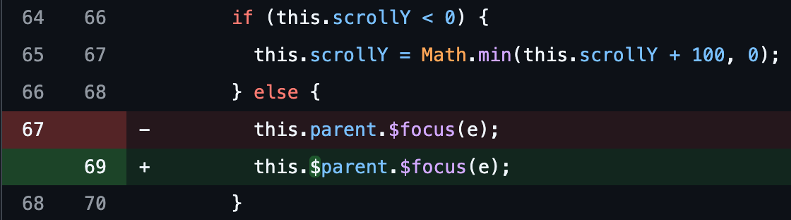
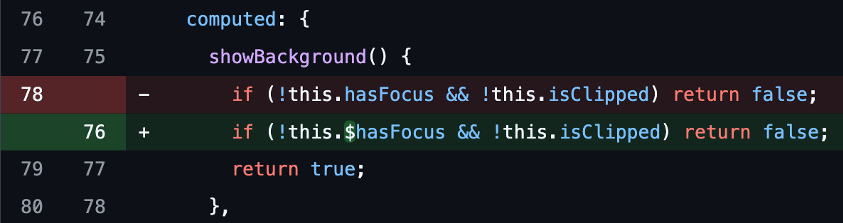
Blits comes with a number of built-in variables (like parent or hasFocus). To prevent potential collisions between these built-ins and your own component state or props, we've renamed them to be prefixed with a $.
This aligns with existing built-in methods (like $focus() or $select()), making it clearer what is part of Blits itself.
We've also taken the opportunity to fully remove the deprecated this.focus, this.select, and this.trigger in favor of their $-prefixed counterparts.
In your app, you'll need to rename occurrences like:
this.parent→this.$parentthis.hasFocus→this.$hasFocusthis.isHovered→this.$isHovered
Note that built-in variables are now also marked as read-only in the type definitions.
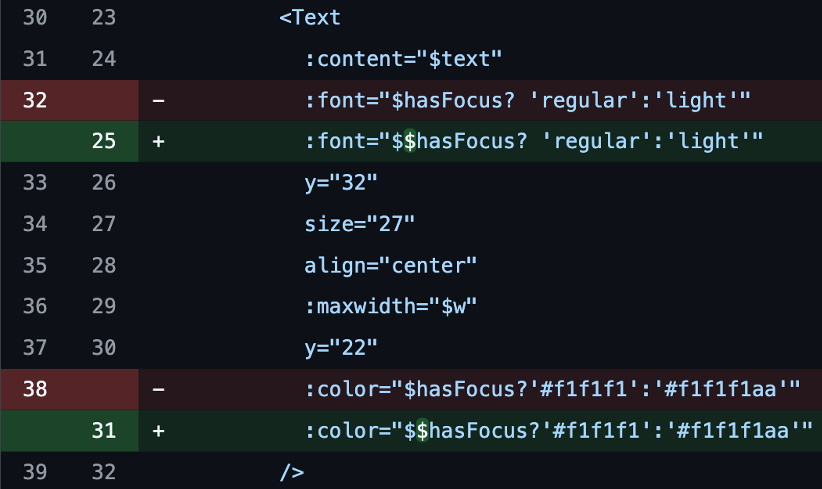
Also, in templates you'll refer to them with double $-signs, i.e. $$hasFocus and $$isHovered.
Examples
Props as an object
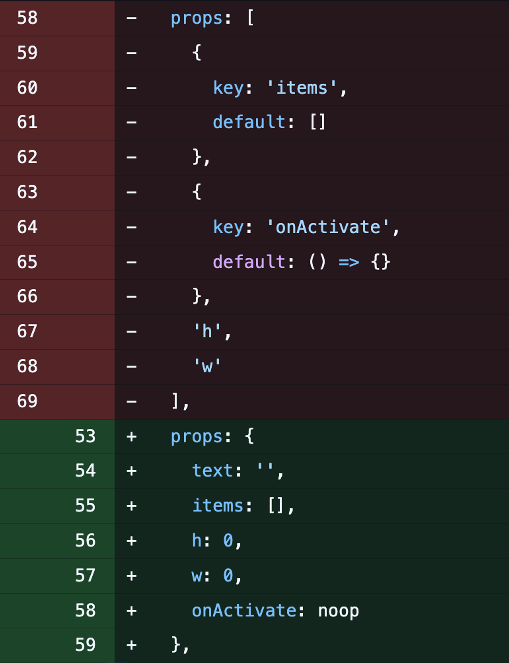
In Blits v1, props were defined as an array of keys. Optionally, an object could be used inside that array to specify default values. In Blits v2, props are defined using object notation.
This new structure has a few advantages:
- Prop keys only need to be defined once
- Proper typing (either explicit or inferred), even in JS codebases
- Better IDE autocomplete
- Cleaner and more readable syntax for default values
This is probably the most impactful change when upgrading to L3.1 - but trust us, it's worth it 🙂
If you're using TypeScript, this change may expose some new type errors. Also, defining default values (where props were previously undefined) may affect parts of your component logic.
prop casting which was previously available in advanced prop notation, has now been removed.
Example
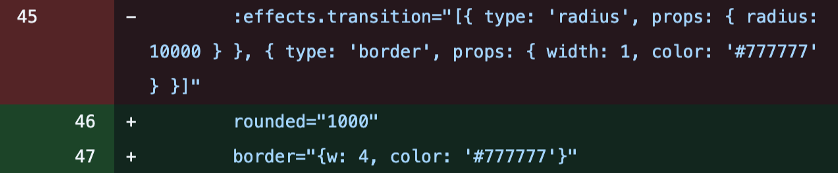
Effects are no more - use dedicated attributes instead
In Renderer v3, we've removed the dynamic shader system that allowed stitching multiple effects together at runtime.
While it was a nice idea in theory, in practice it didn't perform as well as expected. Instead, L3.1 introduces a set of pre-baked shader combinations that achieve the same results more efficiently.
As a result, the effects attribute in the Blits template has been replaced with dedicated attributes. This makes things much more intuitive and easier to read.
To upgrade, search for usages of :effects="" and replace them with the new attributes.
A nice side effect (no pun intended 😅): borders and rounded corners are now reactive again, which means you can dynamically change or even animate them.
The currently available built-in effects:
Border
border="{w: 2, color: '#fff'}"or:border="{top: 2, bottom: 2, color: $borderColor}"Rounded corners -
rounded="10"orrounded="[10, 0, 0, 10]"Shadow
shadow="{color: '#44444480', blur: 16, spread: 8, x: 4, y: 4}"
Note: these config object for effects now use w for width instead of width.
Examples


Props and known Element attributes
Blits elements support a number of known attributes like x, y, color, or src. These attrubutes can also be applied directly on components (e.g. <MyLogo x="10" y="10" src="l3.1.png" />).
In Blits v1, if you defined one of these as a prop, it would lose its original meaning (and not be applied on the Component holder). Instead they would only exist as a prop inside the component.
In Blits v2, this behavior has changed to make it more predictable and consistent:
- Known attributes are always applied to the component itself
- If also defined as a prop, the known attribute is also made available inside the component. This allows for watching the
alphaattribute applied on a component for example.
This seemingly small change may lead to some unexpected rendering differences when upgrading. Common cases are positioning issues due to x or y attributes being applied on the component itself. Props may also unintentionally affect rendering now, if they share their name with known Element props. In those cases, you may need to rename props like color to bgColor or src → img.
Other changes
Some other changes to keep in mind when upgrading from L3.0 to L3.1:
The wordwrap attribute (previously deprecated) has now been fully removed in favor of maxwidth
Across the renderer, width and height are now renamed to w and h. Blits v2 has also dropped the width and height attributes aliases
The MSDF font generator is no longer a Blits dependency. The font generator is still needed for automatic conversion of font files to a png file and glyph atlas, but it should now be installed as an App dependency (a warning is shown if it's missing)
Key mapping has also changed slightly. Previously the mapping relied on a mix of key and keyCode. Now only KeyboardEvent.keyCode is used. Despite being a deprecated web API, it's still more reliable across browsers and it fixes issues like triggering the back() input handler, when pressing 8. This change does mean that input handling for letters and numbers (a(), 1(), etc.) are no longer auto-mapped. They will have to be added manually or handled via the any() input handler
This concludes the main changes between L3.0 and L3.1 from a developer facing point of view. Under the hood the V3 renderer has undergone lot's of changes, to make it faster and more stable.
If you run into anything unexpected during your upgrade, do let us know!